Here is where you will write your second blog post. Be sure to remember to follow the prompt included with the blog reflection assignment for proper credit.
You can also add links and images by clicking the toolbar above. http://www.google.com like that.
Once you are done writing your blog post and feel that you have answered/responded to the blog prompt, then you are ready to publish your blog.
Up there in the top right corner are a few different buttons - Save (in case you want to stop working on your blog post and come back to edit it -- this will not Publish your blog, only save it in your account)
Publish - this saves and publishes it to your blog. This is what you want to do to complete the assignment.
Stay with me as I publish and then view our blog.
January 27, 2012


January 12, 2012
January 24, 2011
Library 204: Blog as Library Tool?
Greetings students!
I've been enjoying reading all the blogs this week. Some of you are new to blogging and some of you seem to be experienced ones -- a good mix -- and while some of you may be scratching your head wondering why I would possibly want you to blog, I assure you that at the end of the class you will see some value in it. (If you don't feel free to express that to me in an upcoming blog response!).
The basic idea of a blog is a personal publishing system with a very important component - the ability for the general public (or restricted users in some cases) to post comments. Feedback! Contribution!
Contribution is a major backbone of the Web 2.0 and Library 2.0 experience. The ability to communicate about and provide content.
Let's take a look at Amazon.com (one of my favorite internet addictions although my bank account doesn't agree with me). When I am searching for a new book to purchase on a favorite topic, I generally browse a specific subject that I find in a keyword search. I narrow down my choices by type of materials (this case a book), and at the bottom of every product page is a list of CATEGORIES that the product belongs to. This is all very similar to a library catalog (OPAC). I can click through the different subjects. I can see other titles that are similar to the one I'm searching for. And, for someone like me who loves reading feedback, I can read REVIEWS! I want to know what other people who have read the book I am considering spending $30 on thinks about it. Was it valuable to them? Wouldn't it also be nice to have a feature in the library OPAC that connected REVIEWS to the item you are searching for?
I do the same thing with hotels. Let's look at my choices. 10 years ago I could go to the Internet and search for hotels on expedia.com, find out information about the property, etc. It is a good possibility that I could even find a webpage for the specific hotel with photos, maybe reservation information, and description of amenities. Today however I can go to TripAdvisor.com and find out other people's opinions on hotels, restaurants, museums, places to visit, etc. In the past two years, feedback in the form of reviews are popping up everywhere! Even on websites like Walmart.com! One of my favorite places to visit is Seattle, Washington. Take a look at the TripAdvisor page for Seattle. Some of these hotels have hundreds of reviews. I can do my own research from opinions and advice from real people, instead of from a book which may or may not be outdated, accurate or biased. Another good example that I use often to find local restaurants, parks, and other places is Yelp.com.
Okay, some might argue that it's gone too far. We have sites like Facebook and Twitter. Some die-hards update their status on these websites every 15 mins, providing information that many of us don't care to know. Yes, it can get overwhelming but it is also pretty amazing how much life has changed just in a few years.
For instance, recently there were Tornado warnings in the Long Beach area. I heard something that a tornado had touched down and was curious where that might have been. So... I went to twitter and searched for tornado and there were already 1000 tweets talking about the weather in Southern California. Some places say that Twitter has become the new "emergency notification system." If you aren't familiar with Twitter, don't worry - we will be talking about it this semester.
Basically the Web 2.0 and Library 2.0 sums up to: People SHARE information with other people, with us.
Blogs are just another way to do that, to provide a platform for someone to share about a specific topic and for others to put in their $.02. In a library environment, it gives the library a human aspect, opens up ideas about new services and really tries to connect the library and the community. Kinda like what I'm trying to do in this class. Hmm...
Something to think about!
Some of my favorite library related blogs are:
LibrarianInBlack.net
TameTheWeb.com
TheShiftedLibrarian.com
TheUbiquitousLibrarian
Here are some examples of how Universities use blogs in their libraries:
Ohio Universities Libraries News
Yale University Library News
Hunter Library News
Example of Teen Services Blogs in Public Libraries
WorthingTeens
Know of any you would like to share?
If you aren't familiar with blogs, try out this blog search tool on Google -- http://blogsearch.google.com/. Enter a favorite topic and click Search. Locate an interesting blog with recent posts (i.e. from 2011) and include in your blog response. Topics can range from Mommy/Daddy blogs, Political Blogs, Blogs on a favorite actor/actress, products, education, career. Anything.
I've been enjoying reading all the blogs this week. Some of you are new to blogging and some of you seem to be experienced ones -- a good mix -- and while some of you may be scratching your head wondering why I would possibly want you to blog, I assure you that at the end of the class you will see some value in it. (If you don't feel free to express that to me in an upcoming blog response!).
The basic idea of a blog is a personal publishing system with a very important component - the ability for the general public (or restricted users in some cases) to post comments. Feedback! Contribution!
Contribution is a major backbone of the Web 2.0 and Library 2.0 experience. The ability to communicate about and provide content.
Let's take a look at Amazon.com (one of my favorite internet addictions although my bank account doesn't agree with me). When I am searching for a new book to purchase on a favorite topic, I generally browse a specific subject that I find in a keyword search. I narrow down my choices by type of materials (this case a book), and at the bottom of every product page is a list of CATEGORIES that the product belongs to. This is all very similar to a library catalog (OPAC). I can click through the different subjects. I can see other titles that are similar to the one I'm searching for. And, for someone like me who loves reading feedback, I can read REVIEWS! I want to know what other people who have read the book I am considering spending $30 on thinks about it. Was it valuable to them? Wouldn't it also be nice to have a feature in the library OPAC that connected REVIEWS to the item you are searching for?
I do the same thing with hotels. Let's look at my choices. 10 years ago I could go to the Internet and search for hotels on expedia.com, find out information about the property, etc. It is a good possibility that I could even find a webpage for the specific hotel with photos, maybe reservation information, and description of amenities. Today however I can go to TripAdvisor.com and find out other people's opinions on hotels, restaurants, museums, places to visit, etc. In the past two years, feedback in the form of reviews are popping up everywhere! Even on websites like Walmart.com! One of my favorite places to visit is Seattle, Washington. Take a look at the TripAdvisor page for Seattle. Some of these hotels have hundreds of reviews. I can do my own research from opinions and advice from real people, instead of from a book which may or may not be outdated, accurate or biased. Another good example that I use often to find local restaurants, parks, and other places is Yelp.com.
Okay, some might argue that it's gone too far. We have sites like Facebook and Twitter. Some die-hards update their status on these websites every 15 mins, providing information that many of us don't care to know. Yes, it can get overwhelming but it is also pretty amazing how much life has changed just in a few years.
For instance, recently there were Tornado warnings in the Long Beach area. I heard something that a tornado had touched down and was curious where that might have been. So... I went to twitter and searched for tornado and there were already 1000 tweets talking about the weather in Southern California. Some places say that Twitter has become the new "emergency notification system." If you aren't familiar with Twitter, don't worry - we will be talking about it this semester.
Basically the Web 2.0 and Library 2.0 sums up to: People SHARE information with other people, with us.
Blogs are just another way to do that, to provide a platform for someone to share about a specific topic and for others to put in their $.02. In a library environment, it gives the library a human aspect, opens up ideas about new services and really tries to connect the library and the community. Kinda like what I'm trying to do in this class. Hmm...
Something to think about!
Some of my favorite library related blogs are:
LibrarianInBlack.net
TameTheWeb.com
TheShiftedLibrarian.com
TheUbiquitousLibrarian
Here are some examples of how Universities use blogs in their libraries:
Ohio Universities Libraries News
Yale University Library News
Hunter Library News
Example of Teen Services Blogs in Public Libraries
WorthingTeens
Know of any you would like to share?
If you aren't familiar with blogs, try out this blog search tool on Google -- http://blogsearch.google.com/. Enter a favorite topic and click Search. Locate an interesting blog with recent posts (i.e. from 2011) and include in your blog response. Topics can range from Mommy/Daddy blogs, Political Blogs, Blogs on a favorite actor/actress, products, education, career. Anything.
April 28, 2010
Linking to file from another website
For your final projects, many of you will need to link your final project file. Our Blogger.com has some limitations for security purposes on which type of files it will allow you to upload, in this case just images and video files. So, if you are interested in linking to a powerpoint presentation, or a word document, or pdf -- then you will need to create a LINK.
You can email me your document and I can put it on the web and give you a website URL to include on your blog. Please email me your final document before the due date.
Here is the help page for how to CREATE A LINK in your blog post. I'm going to do one here:
How to Create a Link -- follow the instructions included on that link.
or... my simple instructions is to type what you want the link to say and then highlight that text, click on the little link icon in the toolbar above (next to the text color) and enter your website url to the link. Try it out!!
Good luck. Remember, email me if you get stuck!
You can email me your document and I can put it on the web and give you a website URL to include on your blog. Please email me your final document before the due date.
Here is the help page for how to CREATE A LINK in your blog post. I'm going to do one here:
How to Create a Link -- follow the instructions included on that link.
or... my simple instructions is to type what you want the link to say and then highlight that text, click on the little link icon in the toolbar above (next to the text color) and enter your website url to the link. Try it out!!
Good luck. Remember, email me if you get stuck!
January 20, 2010
Library 204: Blog as Library Tool?
Greetings students!
I've been enjoying reading all the blogs this week. Some of you seem to be new bloggers and some of you seem to be experienced ones -- a good mix -- and while some of you may be scratching your head wondering why I would possibly want you to blog, I assure you that at the end of the class you will see some value in it. (If you don't feel free to express that to me in an upcoming blog response!).
The major idea of a blog is a personal publishing system with a very important component - the ability for the general public (or restricted users in some cases) to post comments. Feedback! Contribution!
Contribution is a major backbone of the Web 2.0 and Library 2.0 experience. The ability to communicate about and provide content.
Let's take a look at Amazon.com (one of my favorite web pleasures although my bank account doesn't agree with me). When I am searching for a new book to purchase on a favorite topic, I generally browse a specific subject that I find in a keyword search. I narrow down my choices by type of materials (this case a book), and at the bottom of every product page is a list of CATEGORIES that the product belongs to. This is all very similar to a library catalog (OPAC). I can click through the different subjects. I can see other titles that are similar to the one I'm searching for. And, for someone like me who loves reading feedback, I can read REVIEWS! I want to know what other people who have read the book I am considering spending $30 on thinks about it. Was it valuable to them? Wouldn't it also be nice to have a feature in the library OPAC that connected REVIEWS to the item you are searching for?
I do the same thing with hotels. Let's look at my choices. 10 years ago I could go to the Internet and search for hotels on expedia.com, find out information about the property, etc. It is a good possibility that I could even find a webpage for the specific hotel with photos, maybe reservation information, and description of amenities. Today however I can go to TripAdvisor.com and find out other people's opinions on hotels, restaurants, museums, places to visit, etc. In the past two years, feedback in the form of reviews are popping up everywhere! Even on websites like Walmart.com! One of my favorite places to visit is Seattle, Washington. Take a look at the TripAdvisor page for Seattle. Some of these hotels have hundreds of reviews. I can do my own research from opinions and advice from real people, instead of from a book which may or may not be outdated or accurate. Another good example that I use often to find local restaurants, parks, and other places is Yelp.com.
Okay, some might argue that it's gone too far. We have Facebook, MySpace, and Twitter. Some die-hards update their status on these websites every 15 mins, providing information that many of us don't care to know. Yes, it can get overwhelming but it is also pretty amazing how much life has changed just in two years.
For instance, yesterday there were Tornado warnings in the Long Beach area. I heard something that a tornado had touched down and was curious where that might have been. So... I went to twitter and searched for tornado and there were already 1000 tweets talking about the weather in Southern California. Some places say that Twitter has become the new "emergency notification system." If you aren't familiar with Twitter, don't worry - we will be talking about it this semester.
Basically the Web 2.0 and Library 2.0 sums up to: People SHARE information with other people, with us.
Blogs are just another way to do that, to provide a platform for someone to share about a specific topic and for others to put in their $.02. In a library environment, it gives the library a human aspect, opens up ideas about new services and really tries to connect the library and the community. Kinda like what I'm trying to do in this class. Hmm...
Something to think about!
Some of my favorite library related blogs are:
LibrarianInBlack.net
TameTheWeb.com
TheShiftedLibrarian.com
LibrariansMatter.com
TheUbiquitousLibrarian
Here are some examples of how Universities use blogs in their libraries:
Ohio Universities Libraries News
Yale University Library News
Hunter Library News
Example of Teen Services Blogs in Public Libraries
WorthingTeens
Know of any you would like to share?
I've been enjoying reading all the blogs this week. Some of you seem to be new bloggers and some of you seem to be experienced ones -- a good mix -- and while some of you may be scratching your head wondering why I would possibly want you to blog, I assure you that at the end of the class you will see some value in it. (If you don't feel free to express that to me in an upcoming blog response!).
The major idea of a blog is a personal publishing system with a very important component - the ability for the general public (or restricted users in some cases) to post comments. Feedback! Contribution!
Contribution is a major backbone of the Web 2.0 and Library 2.0 experience. The ability to communicate about and provide content.
Let's take a look at Amazon.com (one of my favorite web pleasures although my bank account doesn't agree with me). When I am searching for a new book to purchase on a favorite topic, I generally browse a specific subject that I find in a keyword search. I narrow down my choices by type of materials (this case a book), and at the bottom of every product page is a list of CATEGORIES that the product belongs to. This is all very similar to a library catalog (OPAC). I can click through the different subjects. I can see other titles that are similar to the one I'm searching for. And, for someone like me who loves reading feedback, I can read REVIEWS! I want to know what other people who have read the book I am considering spending $30 on thinks about it. Was it valuable to them? Wouldn't it also be nice to have a feature in the library OPAC that connected REVIEWS to the item you are searching for?
I do the same thing with hotels. Let's look at my choices. 10 years ago I could go to the Internet and search for hotels on expedia.com, find out information about the property, etc. It is a good possibility that I could even find a webpage for the specific hotel with photos, maybe reservation information, and description of amenities. Today however I can go to TripAdvisor.com and find out other people's opinions on hotels, restaurants, museums, places to visit, etc. In the past two years, feedback in the form of reviews are popping up everywhere! Even on websites like Walmart.com! One of my favorite places to visit is Seattle, Washington. Take a look at the TripAdvisor page for Seattle. Some of these hotels have hundreds of reviews. I can do my own research from opinions and advice from real people, instead of from a book which may or may not be outdated or accurate. Another good example that I use often to find local restaurants, parks, and other places is Yelp.com.
Okay, some might argue that it's gone too far. We have Facebook, MySpace, and Twitter. Some die-hards update their status on these websites every 15 mins, providing information that many of us don't care to know. Yes, it can get overwhelming but it is also pretty amazing how much life has changed just in two years.
For instance, yesterday there were Tornado warnings in the Long Beach area. I heard something that a tornado had touched down and was curious where that might have been. So... I went to twitter and searched for tornado and there were already 1000 tweets talking about the weather in Southern California. Some places say that Twitter has become the new "emergency notification system." If you aren't familiar with Twitter, don't worry - we will be talking about it this semester.
Basically the Web 2.0 and Library 2.0 sums up to: People SHARE information with other people, with us.
Blogs are just another way to do that, to provide a platform for someone to share about a specific topic and for others to put in their $.02. In a library environment, it gives the library a human aspect, opens up ideas about new services and really tries to connect the library and the community. Kinda like what I'm trying to do in this class. Hmm...
Something to think about!
Some of my favorite library related blogs are:
LibrarianInBlack.net
TameTheWeb.com
TheShiftedLibrarian.com
LibrariansMatter.com
TheUbiquitousLibrarian
Here are some examples of how Universities use blogs in their libraries:
Ohio Universities Libraries News
Yale University Library News
Hunter Library News
Example of Teen Services Blogs in Public Libraries
WorthingTeens
Know of any you would like to share?
July 20, 2009
Thank you!

Thanks to everyone who have sent me messages of congratulations for the new addition to my family -- I figured since many of you have asked to see a picture, that I'd post one here.
I had my son, Logan, on July 4th! He weighed 6 pds 4 ozs and was 20 inches long. He is a complete joy and such a wonderful blessing in my life.
Now, back to grading!! Thanks to all of you for your patience. I wasn't expected to have my son until the class was over, so it was a bit surprising to have him so early.
June 18, 2009
Blog URLs are posted!
This week everyone should already have their blog set up and should be starting to post their reflections and project 1's to it. I'm looking forward to reading your work and reading your comments from other students.
For those of you who are not as familiar with the concept of blogging, let's discuss a few things that might be helpful.
1) Write with the reader in mind - you are writing for others to read, share your opinion, share your thoughts, etc. Stay on topic - don't write about something that has nothing to do with the assigned task or subject matter. The blogs should be specifically about your class experience, your library experience, how you felt doing assignments, or blogging, or posting to discussion forums.. things like that. Feel free to incorporate your own life into the post, we definitely want that, but tie it in somehow to the purpose of the assignment.
2) You don't have to write a novel but a few sentences is NOT ENOUGH. A good blog post is about 250 words -- or a few well developed paragraphs. Try to stick to that. When you are asked to reflect on the course, please don't just write a post something like "I like the class but it is harder than I thought." Really talk about your experience, you won't be graded on your opinions -- you will however be graded on providing a thoughtful response!
3) Use links where possible -- posting to blogs is a great way to share things you've seen on the Internet that you'd like to talk about. If you come across a cool blog that you would like to share with the class, by all means do so!
4) Update your profile -- post a picture of yourself or something that interests you. Tell everyone a little about yourself. It's a great way for your blog readers (aka classmates) to get to know you.
5) Comment, comment, comment! Let people know you've read their blog. Say hi. Leave a small comment. Blogging is a form of communication.
For more helpful tips, see Tips to Writing Blog Entries.
Okay, those are my thoughts for today! Happy Blogging everyone!
For those of you who are not as familiar with the concept of blogging, let's discuss a few things that might be helpful.
1) Write with the reader in mind - you are writing for others to read, share your opinion, share your thoughts, etc. Stay on topic - don't write about something that has nothing to do with the assigned task or subject matter. The blogs should be specifically about your class experience, your library experience, how you felt doing assignments, or blogging, or posting to discussion forums.. things like that. Feel free to incorporate your own life into the post, we definitely want that, but tie it in somehow to the purpose of the assignment.
2) You don't have to write a novel but a few sentences is NOT ENOUGH. A good blog post is about 250 words -- or a few well developed paragraphs. Try to stick to that. When you are asked to reflect on the course, please don't just write a post something like "I like the class but it is harder than I thought." Really talk about your experience, you won't be graded on your opinions -- you will however be graded on providing a thoughtful response!
3) Use links where possible -- posting to blogs is a great way to share things you've seen on the Internet that you'd like to talk about. If you come across a cool blog that you would like to share with the class, by all means do so!
4) Update your profile -- post a picture of yourself or something that interests you. Tell everyone a little about yourself. It's a great way for your blog readers (aka classmates) to get to know you.
5) Comment, comment, comment! Let people know you've read their blog. Say hi. Leave a small comment. Blogging is a form of communication.
For more helpful tips, see Tips to Writing Blog Entries.
Okay, those are my thoughts for today! Happy Blogging everyone!
June 2, 2009
Summer 2009 starts now!
Well, here we are with another summer LIB 3 class... I'm very excited because LIB 3 is my favorite class to teach and I only teach it once a year. We do lots of fun activities and it seems that we really get to know one another.
My summer schedule is pretty limited at the LAC library - I will be working on campus only the first few weeks of June, and mostly in the evenings. If you need to contact me, the best way will be through email or instant messaging.
Looking forward to the class!
My summer schedule is pretty limited at the LAC library - I will be working on campus only the first few weeks of June, and mostly in the evenings. If you need to contact me, the best way will be through email or instant messaging.
Looking forward to the class!
January 3, 2009
Update on my Father
Thanks to all of you for your support this past year -- many of you were aware of the fight my father was having with Lung Cancer. He was diagnosed in Feb/Mar and had several rounds of radiation and chemotherapy. Thankfully he had a good summer and was able to be quite independent and enjoy himself. But sadly, in September of this year he took a turn for the worse. After whole brain radiation in October, he was not able to walk or care for himself independently.
He put up a good fight and continued to be his charming, generous, entertaining self throughout. He taught his home-care worker how to cook Italian food... mentoring someone in even his last few weeks of life. He encouraged the young adults in his life to be the best that they could be. He will be missed greatly.
http://obit.desmondfuneralhome.com/obitdisplay.html?id=618435
He put up a good fight
http:
November 4, 2008
Have you voted!?
Get out and vote today!
Here's the Google Logo for the day -- I love when they do these things! Isn't it cute!
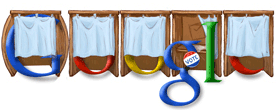
Let's hope this election goes the way I want it to :)
Here's the Google Logo for the day -- I love when they do these things! Isn't it cute!
Let's hope this election goes the way I want it to :)
November 2, 2008
Falling Behind, Catching Up
Some of you may have wondered if I have fallen off the face of the earth the past few weeks... and, well, yah, I guess I have. Not intending to drag my students into my personal life, I haven't really mentioned what has been going on, and I'm kind of struggling with whether to throw it out there or not. But, since I live within the definition of "being human" I figure what can it harm.
I was out of town last week, back in Michigan, to visit my very ill father. Several months ago in my blog I mentioned that he had recently been diagnosed with Stage IV lung cancer with brain metastases (cancer tumors). He had radiation and chemo back in the Spring and I'm happy to say that he had a pretty good summer. However, the cancer took back over last month and it's been a pretty rough downhill spiral. I made an emergency visit to see him and assist with his care (he refuses to go into a nursing home for care so my siblings are doing a fantastic job helping him with his 24/7 care).
Therefore I apologize if I've been a bit "absent" the past two weeks. I'm intending to catch up on grading and will have the remaining assignments posted shortly. Thanks for your patience and understanding!
In all honesty I have greatly enjoyed reading the blog postings and project 2 responses. As always, I love the forum participation. Even if I'm not putting my $.02 in everywhere doesn't mean I'm not here... looking on like the proud teacher I am. I love when the students "get it" and I can see the lightbulb going off as well.
Keep up the great work!
Dena
I was out of town last week, back in Michigan, to visit my very ill father. Several months ago in my blog I mentioned that he had recently been diagnosed with Stage IV lung cancer with brain metastases (cancer tumors). He had radiation and chemo back in the Spring and I'm happy to say that he had a pretty good summer. However, the cancer took back over last month and it's been a pretty rough downhill spiral. I made an emergency visit to see him and assist with his care (he refuses to go into a nursing home for care so my siblings are doing a fantastic job helping him with his 24/7 care).
Therefore I apologize if I've been a bit "absent" the past two weeks. I'm intending to catch up on grading and will have the remaining assignments posted shortly. Thanks for your patience and understanding!
In all honesty I have greatly enjoyed reading the blog postings and project 2 responses. As always, I love the forum participation. Even if I'm not putting my $.02 in everywhere doesn't mean I'm not here... looking on like the proud teacher I am. I love when the students "get it" and I can see the lightbulb going off as well.
Keep up the great work!
Dena
September 25, 2008
Week 6 of the fall semester
Wow. Week 6 already! Seems like we just started the semester.
Library 1 is coming to an end soon. Good class. This is the first semester I've taught it as a graded course instead of a CR/NC class. Quite a difference in student performance when a grade is at stake, which I appreciate. I've pulled the research project due date to week 8 to see if I get better quality work. Some projects seem very thrown together at the last minute. I have another section of Library 1 starting the last 9 weeks of class and it will be a very full class! Very full. Already have over 50 people on my waiting list. I'm going to see how many people I can pull in from that.
I really love Library 204, a great group of students and the first of the core library technician students. We've talked about concepts that are a good reminder for me about why I enjoy being a librarian. The ultimate purpose - we are here to assist our patrons with their information needs, whether that patron is standing in front of me or talking to me through instant messaging, sending an email or just visiting our website.
Sometimes I get so caught up in the Systems aspect of my job - the computers, the databases, the Voyager system (and upgrade), the statistics, the computer labs... that I feel further from the real purpose. I guess that is why I enjoy teaching my classes so much - gives me that one-on-one connection with the students and allows me to share some of my knowledge with them that hopefully they can take on to further places and share with others - their kids, friends, parents, and maybe someday their own students if they go on to become a librarian. Perhaps!
Well, this is my own 6 week reflection. All the students in my class probably hate the reflections I ask them to do - so I figured I'd do my own too. Just so I can enjoy the process as well!
Take care!
Library 1 is coming to an end soon. Good class. This is the first semester I've taught it as a graded course instead of a CR/NC class. Quite a difference in student performance when a grade is at stake, which I appreciate. I've pulled the research project due date to week 8 to see if I get better quality work. Some projects seem very thrown together at the last minute. I have another section of Library 1 starting the last 9 weeks of class and it will be a very full class! Very full. Already have over 50 people on my waiting list. I'm going to see how many people I can pull in from that.
I really love Library 204, a great group of students and the first of the core library technician students. We've talked about concepts that are a good reminder for me about why I enjoy being a librarian. The ultimate purpose - we are here to assist our patrons with their information needs, whether that patron is standing in front of me or talking to me through instant messaging, sending an email or just visiting our website.
Sometimes I get so caught up in the Systems aspect of my job - the computers, the databases, the Voyager system (and upgrade), the statistics, the computer labs... that I feel further from the real purpose. I guess that is why I enjoy teaching my classes so much - gives me that one-on-one connection with the students and allows me to share some of my knowledge with them that hopefully they can take on to further places and share with others - their kids, friends, parents, and maybe someday their own students if they go on to become a librarian. Perhaps!
Well, this is my own 6 week reflection. All the students in my class probably hate the reflections I ask them to do - so I figured I'd do my own too. Just so I can enjoy the process as well!
Take care!
September 18, 2008
A Librarian's Lexicon for the Layperson
Highly recommended reading defining terms we have or will be talking about in our LIB 204 class.
A Librarian's Lexicon for the Layperson:
"As is quite well known, librarians are afflicted with a particular strain of linguistic debillitation known as jargonitis, or inflammation of the jargon gland. "
A Librarian's Lexicon for the Layperson:
"As is quite well known, librarians are afflicted with a particular strain of linguistic debillitation known as jargonitis, or inflammation of the jargon gland. "
September 2, 2008
Another new Google tool
Being a Google fanatic, I enjoy learning about and using Google's new toys... I mean... tools!
Today they released the Google Chrome beta - Google's version of a browser. You can just type in searches in the URL address bar and it will perform a search for you. Smart. LOL.
Check out more about Google Chrome and download it to try it out!
I'll keep you posted on my thoughts about it. This could take some time getting used to!
Today they released the Google Chrome beta - Google's version of a browser. You can just type in searches in the URL address bar and it will perform a search for you. Smart. LOL.
Check out more about Google Chrome and download it to try it out!
I'll keep you posted on my thoughts about it. This could take some time getting used to!
August 29, 2008
Library 204: Blog as a Library Tool?
Greetings students!
I've been enjoying reading all the blogs this week. The majority of you seem to be new bloggers -- and while some of you may be scratching your head wondering why I would possibly want you to blog, I assure you that at the end of the class you will see some value in it. (If you don't feel free to express that to me as I'm a feedback nut).
The major idea of a blog is a personal publishing system with a very important component - the ability for the general public (or restricted users in some cases) to post comments. Feedback! Contribution!
Let's take a look at Amazon. When I am searching for a new book to purchase on a favorite topic, I generally browse a specific subject that I find in a keyword search. I narrow down my choices by type of materials (this case a book), and at the bottom of every product page is a list of CATEGORIES that the product belongs to. This is all very similar to a library catalog (OPAC). I can click through the different subject. I can see other titles that are similar to the one I'm searching for. And, for someone like me who is a feedback nut, I can read REVIEWS! I want to know what other people who have read the book I am considering spending $30 on thinks about it. Was it valuable to them? Wouldn't it also be nice to have a feature in the library OPAC that connected REVIEWS to the item you are searching for?
I do the same thing with hotels. Let's look at my choices. 10 years ago I could go to the Internet and search for hotels on expedia.com, find out information about the property, etc. It is a good possibility that I could even find a webpage for the specific hotel with photos, maybe reservation information, and description of amenities. Today however I can go to TripAdvisor.com or RealTravel.com and find out other people's opinions on hotels, restaurants, museums, places to visit, etc. One of my favorite places to visit is Seattle, Washington. Take a look at the TripAdvisor page for Seattle. Some of these hotels have hundreds of reviews. I can do my own research from opinions and advice from real people, instead of from a book which may or may not be outdated or accurate. Another good example that I use often to find local restaurants, parks, and other places is Yelp.com. People SHARE information with other people, with us.
Blogs are just another way to do that, to provide a platform for someone to share about a specific topic and for others to put in their $.02. In a library environment, it gives the library a human aspect, opens up ideas about new services and really tries to connect the library and the community. Kinda like what I'm trying to do in this class. Hmm...
Something to think about!
Some of my favorite library related blogs are:
LibrarianInBlack.net
TameTheWeb.com
TheShiftedLibrarian.com
LibrariansMatter.com
TheUbiquitousLibrarian
Here are some examples of how Universities use blogs in their libraries:
Ohio Universities Libraries News
Yale University Library News
Hunter Library News
Example of Teen Services Blogs in Public Libraries
WorthingTeens
Know of any you would like to share?
I've been enjoying reading all the blogs this week. The majority of you seem to be new bloggers -- and while some of you may be scratching your head wondering why I would possibly want you to blog, I assure you that at the end of the class you will see some value in it. (If you don't feel free to express that to me as I'm a feedback nut).
The major idea of a blog is a personal publishing system with a very important component - the ability for the general public (or restricted users in some cases) to post comments. Feedback! Contribution!
Let's take a look at Amazon. When I am searching for a new book to purchase on a favorite topic, I generally browse a specific subject that I find in a keyword search. I narrow down my choices by type of materials (this case a book), and at the bottom of every product page is a list of CATEGORIES that the product belongs to. This is all very similar to a library catalog (OPAC). I can click through the different subject. I can see other titles that are similar to the one I'm searching for. And, for someone like me who is a feedback nut, I can read REVIEWS! I want to know what other people who have read the book I am considering spending $30 on thinks about it. Was it valuable to them? Wouldn't it also be nice to have a feature in the library OPAC that connected REVIEWS to the item you are searching for?
I do the same thing with hotels. Let's look at my choices. 10 years ago I could go to the Internet and search for hotels on expedia.com, find out information about the property, etc. It is a good possibility that I could even find a webpage for the specific hotel with photos, maybe reservation information, and description of amenities. Today however I can go to TripAdvisor.com or RealTravel.com and find out other people's opinions on hotels, restaurants, museums, places to visit, etc. One of my favorite places to visit is Seattle, Washington. Take a look at the TripAdvisor page for Seattle. Some of these hotels have hundreds of reviews. I can do my own research from opinions and advice from real people, instead of from a book which may or may not be outdated or accurate. Another good example that I use often to find local restaurants, parks, and other places is Yelp.com. People SHARE information with other people, with us.
Blogs are just another way to do that, to provide a platform for someone to share about a specific topic and for others to put in their $.02. In a library environment, it gives the library a human aspect, opens up ideas about new services and really tries to connect the library and the community. Kinda like what I'm trying to do in this class. Hmm...
Something to think about!
Some of my favorite library related blogs are:
LibrarianInBlack.net
TameTheWeb.com
TheShiftedLibrarian.com
LibrariansMatter.com
TheUbiquitousLibrarian
Here are some examples of how Universities use blogs in their libraries:
Ohio Universities Libraries News
Yale University Library News
Hunter Library News
Example of Teen Services Blogs in Public Libraries
WorthingTeens
Know of any you would like to share?
August 25, 2008
Lets talk about Library 2.0
This weeks discussion is centered around Reference Services -- what is our idea of providing valuable reference services to our patrons. When we think of library reference services are we assuming that the interaction always has to occur in a face-to-face setting? How can we provide reference services 24 hrs a day? How can we reach out to the Internet generation? People browsing our website? Where else can we reach the patrons?
I'm going to provide a few links to other blogs that provide discussion about Library 2.0. We will be reading much about Library 2.0, Web 2.0 and other services to provide over the Internet to inspire ideas that might help us discover new ways to reach patrons.
Library Crunch - Service for the Next Generation Library - A Library 2.0 Perspective by Michael Casey
Tame the Web - Libraries, Technology and People - by Michael Stephens
I'm going to provide a few links to other blogs that provide discussion about Library 2.0. We will be reading much about Library 2.0, Web 2.0 and other services to provide over the Internet to inspire ideas that might help us discover new ways to reach patrons.
Library Crunch - Service for the Next Generation Library - A Library 2.0 Perspective by Michael Casey
Tame the Web - Libraries, Technology and People - by Michael Stephens
August 18, 2008
Library 204: Day One
I'm so excited to be starting another class - a brand new class! Library 204 - Intro to Reference Services. I have tons of ideas for work that we will be doing together. As usual, I will incorporate blog reflections into the course. It works well for me and I think the students enjoy the reflection and collaboration process as well. Other assignments and projects will be discussed/revealed soon. :)
New students welcome! Returning students -- glad to see you!
New students welcome! Returning students -- glad to see you!
August 6, 2008
Excellent report in CQ Researcher this week
Internet Accuracy - How Reliable is Information Found on the Web (dated August 1st, 2008)
Wow - an excellent report. It discusses information that we have talked about in this course. Particularly about the concept of community contributions to wikis for reference material (namely Wikipedia) and how the accuracy of that information can affect other information resources.
The report also discusses how the younger generation is used to information overload, and how most people who know how to use a search engine can FIND information on the web, but is it the BEST source out there for them to utilize.
Check it out and let me know what you think of it. I will definitely be using this report as a reading assignment for future courses!
Wow - an excellent report. It discusses information that we have talked about in this course. Particularly about the concept of community contributions to wikis for reference material (namely Wikipedia) and how the accuracy of that information can affect other information resources.
The report also discusses how the younger generation is used to information overload, and how most people who know how to use a search engine can FIND information on the web, but is it the BEST source out there for them to utilize.
Check it out and let me know what you think of it. I will definitely be using this report as a reading assignment for future courses!
Oppose the suggestion to close the Main Branch of the Long Beach Public Library
Spreading the word about the disturbing suggestion to close the main branch of the Long Beach Public Library to save money.
Please read about the situation at the blog below:
http://savelbpl.blogspot.com/
Help spread the word!
Please read about the situation at the blog below:
http://savelbpl.blogspot.com/
Help spread the word!
July 23, 2008
Lib 3: Final project inspiration
Here is a final project example from a prior Library 3 student - Scott Zettlemoyer- his blog post for his final project is: http://lbccszlib3.blogspot.com/. The format has changed slightly but it's a good example for you to view to help you understand what you should be working toward.
Subscribe to:
Posts (Atom)